what happens bts when you git add and git commit
A look inside Git's content-addressable object store: blobs, trees, commits, staging, and history.
Git is an content-addressable filesystem which means it store the data in key-value pair, we can store literally anything in the git repo and it will give back to us a key corresponding to that content. for git everything is an object. we can store any content in the form of either blob, tree or object.
Blob, tree and commit
let's first talk about blob so it's an data type which contains only data of the file and not the filename or nothing.
then there is tree data type it stores either the reference to blob or other tree, so basically we can use this for folders.
now commit, it stores the snapshots( different versions of our files), it can store either reference to some tree, parent commit, author and the message.
so we must have heard many a times that git is an version control system which is indeed true we can basically jump from one version of file / folder / project to another version whenever we wants.
Initialising the repository
so let's talk about it more
so we initiates a git repo by
git init
it will initialise a git repo. in the current directory or we can put the folder name after init with space which will initialize the repo in that folder or create new one if that doesn't exist.
now when you run that command it creates a hidden directory .git which has a folder object where all of our hash objects and everything is stored.
Writing objects
now you might be thinking how do we hash it, so there is command for that like down below you can are not passing any file but text itself, --stdin tells that take the content from terminal itself, we are not providing any file as of now, -w tells it to write the key to the object store and not simply return it.
echo 'hello' | git hash-object -w --stdin
running this command will return us with 40-character checksum hash(SHA-1 hash), which will store the content of ours in that objects folder we talked earlier in which it will take first 2 chars and use that for folder name and other as file. we can inspect the content of that hash via git cat-file command like following, -p tells to figure out the type of content, blog or tree or commit
git cat-file -p <object-hash>
git cat-file -t <object-hash>
we can also check the object type changing the -p to -t like following
again, say we wanna put the content of some file now, say hello.txt, then
git hash-object -w hello.txt
rest remains the same.
Trees and the staging area
now let's talk about trees, it helps us in storing file names and directories/folders.
we can store the tree in the following fashion
here you can see main branch is referencing to many blob and even another tree as well.
it would look like this visually,
so now question is how do we create a tree? git create a tree by taking the state of our staging area or index, so we need to do that first. we can do that by using update-index command.
git update-index --add --cacheinfo 100644 <blob-hash> test.txt
git write-tree
--cacheinfo tell that take the file from database(object store), --add to put the files in the staging area or create the stage first if not there any yet. 100644 is one of 3 modes, you can google about that.
now our test.txt would be add to stage. now we can create the tree using following command. and our tree with this blob and filename will be created.
now suppose we made some change in the file and wanna stage that than simply we can using the eariler command but without --add as it's already in the staging area right?
Commits and history
now let's talk bit about commit, it's fairly simple
we can just use git commit-tree command for this
echo 'first commit' | git commit-tree <tree-hash>
and we can inspect that using the same we have been using since ages now. cat-file.
you can notice the author name and mail id which we configure during git setup.
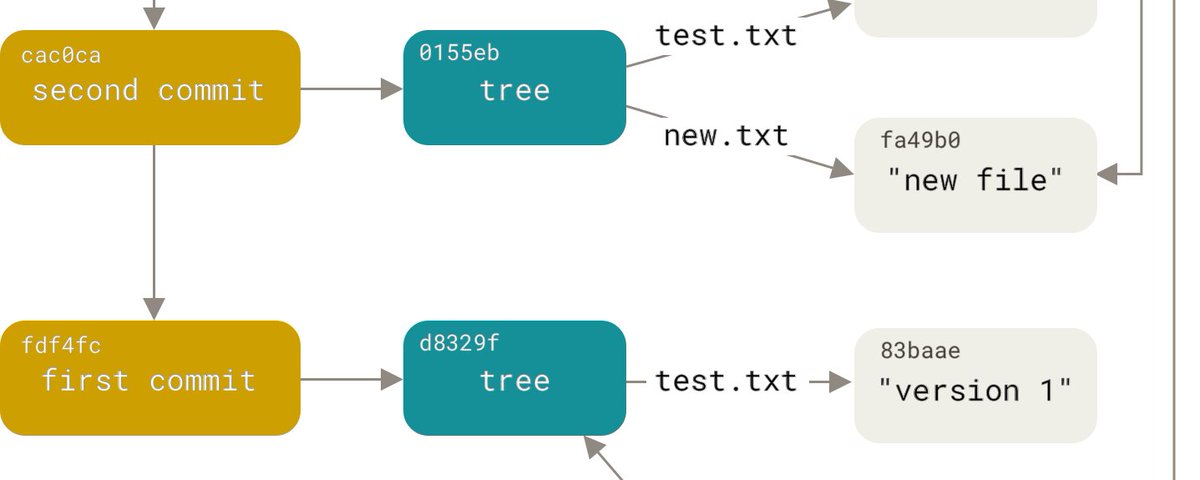
similarly we can keep on commiting to add different version like this. you can see we are using first 7 chars of the hash value for reference.
third is pointing to second and second is pointing to first commit.
then we can git log and would look around like this.
finally it would look like this visually.
Thanks for reading.
references: Git internals